🔐 Connected via official Google Business Profile API, OAuth 2.0 secure
Manage, Sell and Prove your Local SEO: For All Your Clients
The white-label GBP platform connected via official Google Business Profile API. One dashboard for your entire client fleet: heatmap, Guardian monitoring, bulk actions and branded reports. One-time entry price.
Save time on every client. Sell recurring GBP management. Prove your value every month with branded reports. LocalEdge tells you exactly what to do, and does most of it for you.
What agencies pay per year vs what you pay once
$468/year with competitors. $89 one-time here. And you get more.
The agency growth engine
Save time on every client
Bulk actions, AVI automation and fleet dashboard replace 10 Google tabs. Manage 50 clients in the time it used to take for 5.
Sell recurring GBP management
Guardian, heatmap and monthly reports give you a concrete, provable service to bill every month. Turn one-off projects into retainers.
Prove your value every month
White-label PDF reports, score evolution and Guardian alerts show your clients exactly what you do, and why they should stay.
How it works
Choose your plan, pay once. Receive your agency credentials and access your dashboard instantly by email.
One payment. Unlimited potential.
Authorize each client Google Business Profile via official OAuth, secure, approved access to the Google Business Profile API, one click per location.
Your agency account. Your clients listings.
Every client GBP monitored 24/7. On the hourly API check, when Google changes something · hours, address, phone, status · you get an alert within the hour with the exact field and a one-click fix. You act before your client notices, before they call, before they churn.
The agency that catches problems first keeps clients longest.
 AVI
Agency Fleet Intelligence
Monitoring your fleet
Continuously trained
AVI
Agency Fleet Intelligence
Monitoring your fleet
Continuously trained
The intelligence behind your agency's results
AVI · Avision Virtual Intelligence · trained specifically for Local SEO and GBP fleet management.
AVI is trained for LocalEdge Agency : fleet GBP, client ROI and multi-location ops. It flags what matters, drafts at scale, and keeps every profile moving.
- Urgent clients identified across your fleet
- Bulk review replies with AVI
- Enriched PDF reports with AVI summary
- Fleet alerts 24/7
AVI, your fleet co-pilot
AVI analyzes your fleet in real time, detects at-risk clients, names your competitors and tells you exactly what to do : across your entire fleet.
What AVI can do
Manage, Sell and Prove your Local SEO: For All Your Clients
White-label embed for your client fleet. Volume pricing by tier.
🏢 Agency Cockpit
Example: an agency prioritizing clients by score, rank, and Guardian alerts in one dashboard.
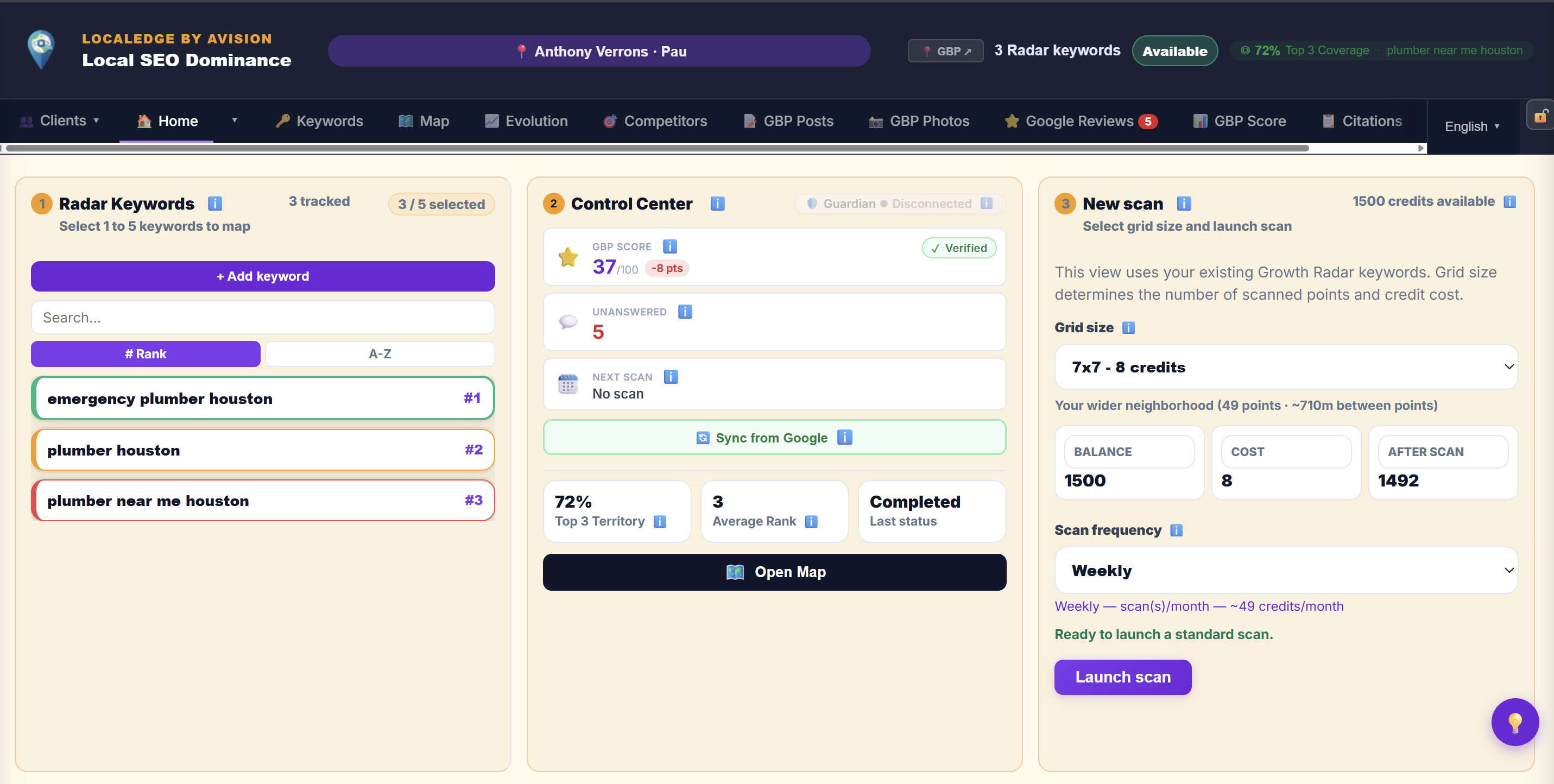
- Fleet dashboard : all clients at a glance
- Switch profiles in one click
- Fleet Health Score (0-100)
- Import clients via Google OAuth
- Sub-accounts + collaborators (T1→1 / T2→5 / T3→unlimited)
- Active licenses dashboard (Guardian / Pro / Bundle)
- Weekly fleet digest : every Monday by email
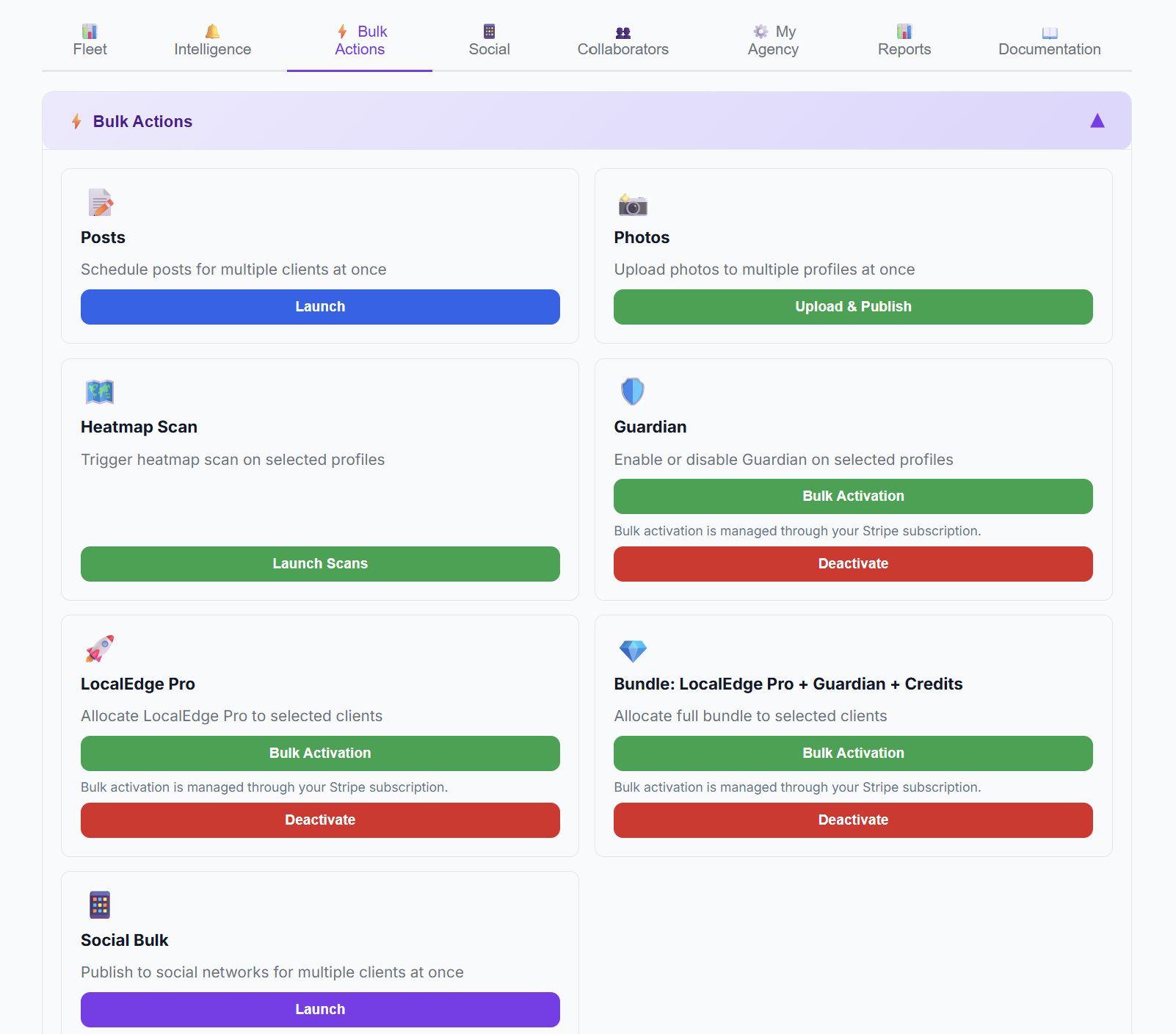
⚡ Bulk Actions : Your fleet multiplier
Example: an agency generating AVI post drafts for many profiles, then bulk publishing.
Scale your agency without hiring : bulk actions let you manage 50 clients in the time it used to take for 5.
- 📅 Editorial Calendar + Bulk Posts : drag & drop, recurring posts with AVI variants
- AI-generated post variants : AVI creates a different version for each date, no duplicates
- 📸 Bulk Photos : unique per client, Google spam-safe
- 🗺️ Bulk Heatmap Scan : per-client keywords, up to 5 per profile
- 🛡️ Bulk Guardian : activate or deactivate across your fleet
- ✨ Bulk Pro + Bundle : allocate premium licenses in a few seconds
- 📄 Bulk PDF Reports : branded, ZIP download, 6 languages
- ⭐ Bulk Reviews : reply at scale to reviews across your entire fleet with AVI
- 🤖 AVI Agency Chat : smart fleet management, urgent client alerts
- 📊 Enriched PDF reports : cover page, score charts, AVI summary
- Coming soon · 🍽️ Bulk GBP Menus (N clients)
- Coming soon · 🛠️ Bulk GBP Services
- Coming soon · 📦 Bulk GBP Products
- 📈 Fleet Growth Index (IC per client + drop alert)
- ⏰ Bulk scheduled publishing (N×3 credits)
📄 White-label Reports
Example: an agency sending monthly white-label PDF reports to show measurable GBP work.
- PDF reports with your agency logo + colors
- Configurable sections: Score / Keywords / Heatmap / Competitors / Guardian
- 6 languages : generate in your client's language
- Preview before sending
- Bulk ZIP : all clients in one download
- Automated weekly email to each client
Whitelabel : Your Brand, Your MRR
Resell LocalEdge under your brand. Turn every client departure into recurring revenue.
Full Whitelabel with your own domain? Contact us: contact@avision.org
🗺️ Heatmap & Territory
Example: an agency discovering a client ranks #1 nearby but #15 two miles away on the heatmap.
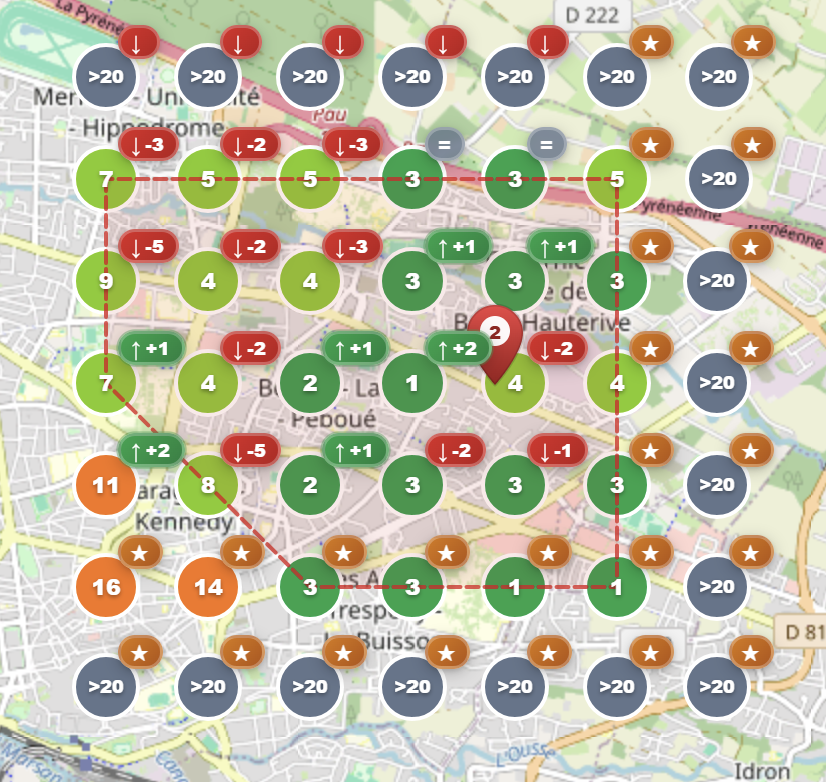
- Geo-grid up to 21×21 points
- Up to 5 keywords per scan
- Scheduled scans (daily / weekly / monthly)
- Ranking history and evolution
- Competitor overlay on every grid point
- Opportunity Zones N/S/E/W : conquer weak zones ★
Competitor territory overlay: 🔴 Danger (they outrank you), 🟠 Threat (closing in), 🟢 Repelled (you dominate) : with specific counter-actions for each zone
🛡️ Guardian Fleet, Your Clients' GBP Never Sleeps 🛡️ Premium add-on
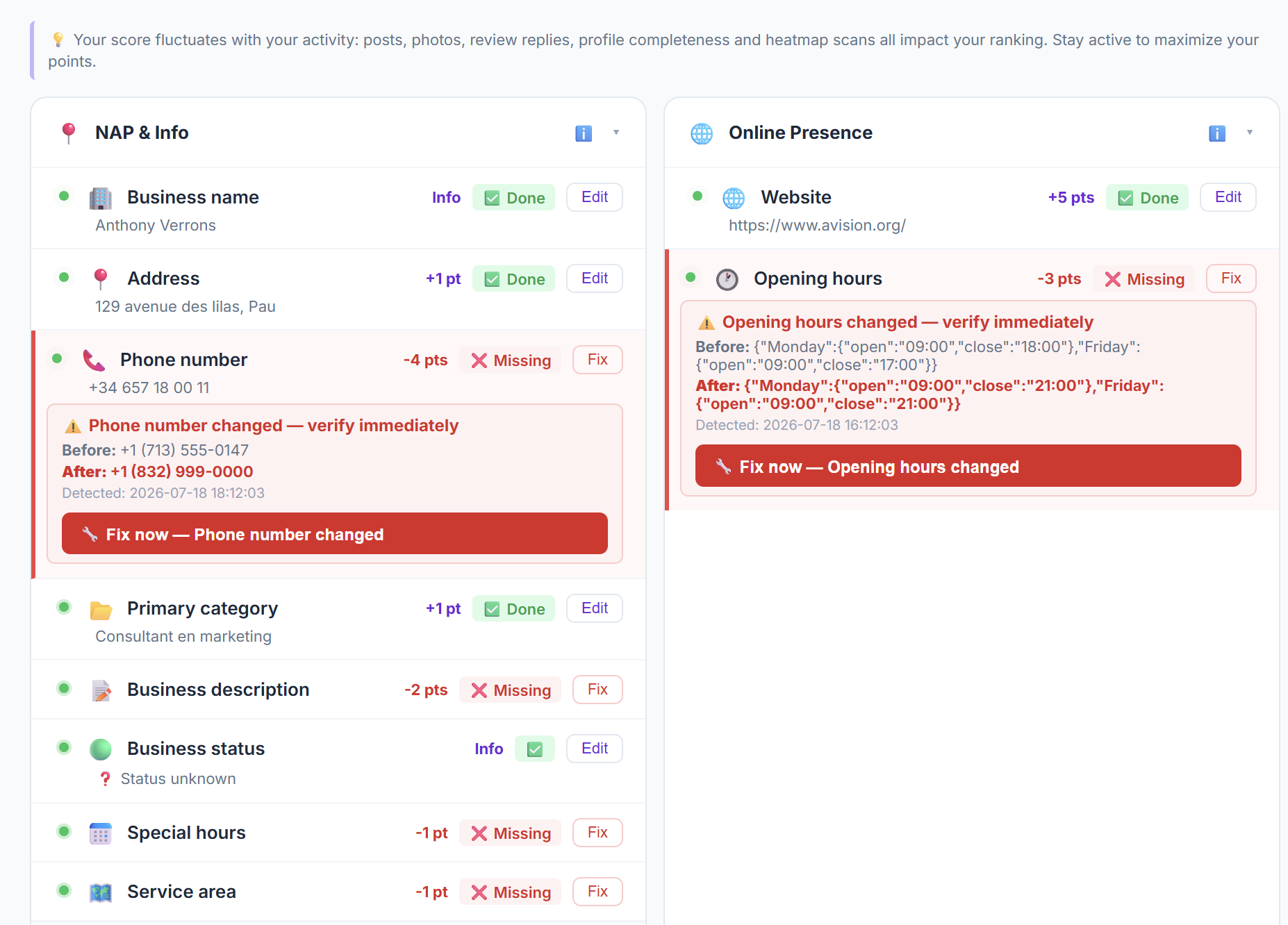
Example: an agency receiving a Guardian alert within the hour after an unauthorized GBP phone change.
Google's own data: 94 million edits made to Google Maps in 2024 alone. Any of your clients could lose customers tonight because of one silent, unauthorized change. Without Guardian, you find out when it's already too late.
-
Because LocalEdge has approved access to the Google Business Profile API, Guardian queries the official Google API for each client profile and compares every field on the hourly check. You manage your agency. Guardian watches every listing.
-
🏢 Business name · 📍 Address · 📞 Phone · 🌐 Website · 📂 Primary category · 🏷️ Additional categories · 🕐 Opening hours · 📅 Special hours · 📝 Description · 🟢 Business status · 🗺️ Service area · 📌 Map PIN · 💻 Online appointments · 🔗 Appointment URL · 🏆 Competitor position · 🚨 GBP Suspension. Across your entire fleet, simultaneously. No other tool in the world monitors and protects all up to 18 of these fields via hourly API checks with alerts within the hour.
-
One alert per change. The exact field, before and after, side by side. A Fix Now button lets you restore the correct information in one click via the official Google API, without opening Google Business Profile. Your client's listing is corrected before they even notice.
-
A suspended GBP makes your client's business invisible on Google Maps. Guardian detects suspension on the hourly API check and sends you a 🚨 URGENT alert within the hour with the exact steps to reinstate, so your client loses as few days as possible. If one of your clients gets suspended, you know within the hour, before they do. No other agency tool offers hourly suspension detection via the API with guided reinstatement.
-
All your clients, all their alerts, centralized in one cockpit. Filter by client, by alert type, by date. You see everything at a glance. If a competitor overtakes a client in their local zone, or if a client drops out of the Top 3 on a strategic keyword, you get an alert within the hour after the hourly check, so you can act before it costs them customers.
-
Activate Guardian for all your clients in one click. One subscription per client profile, all listings protected simultaneously. Manage, monitor and protect your entire fleet from a single dashboard.
The most technically advanced GBP protection on the market. The only agency tool that monitors all 18 fields, flags suspension on the hourly API check with alert within the hour, and watches competitors simultaneously across your entire fleet. Guardian is your most powerful anti-churn tool. A client who sees you catching threats they never even knew about, does not leave. The agency that detects a suspension before the client does, keeps that client.
📊 GBP Score & AVI Coach
Example: an agency using GBP Score to show a client which profile gaps to fix first.
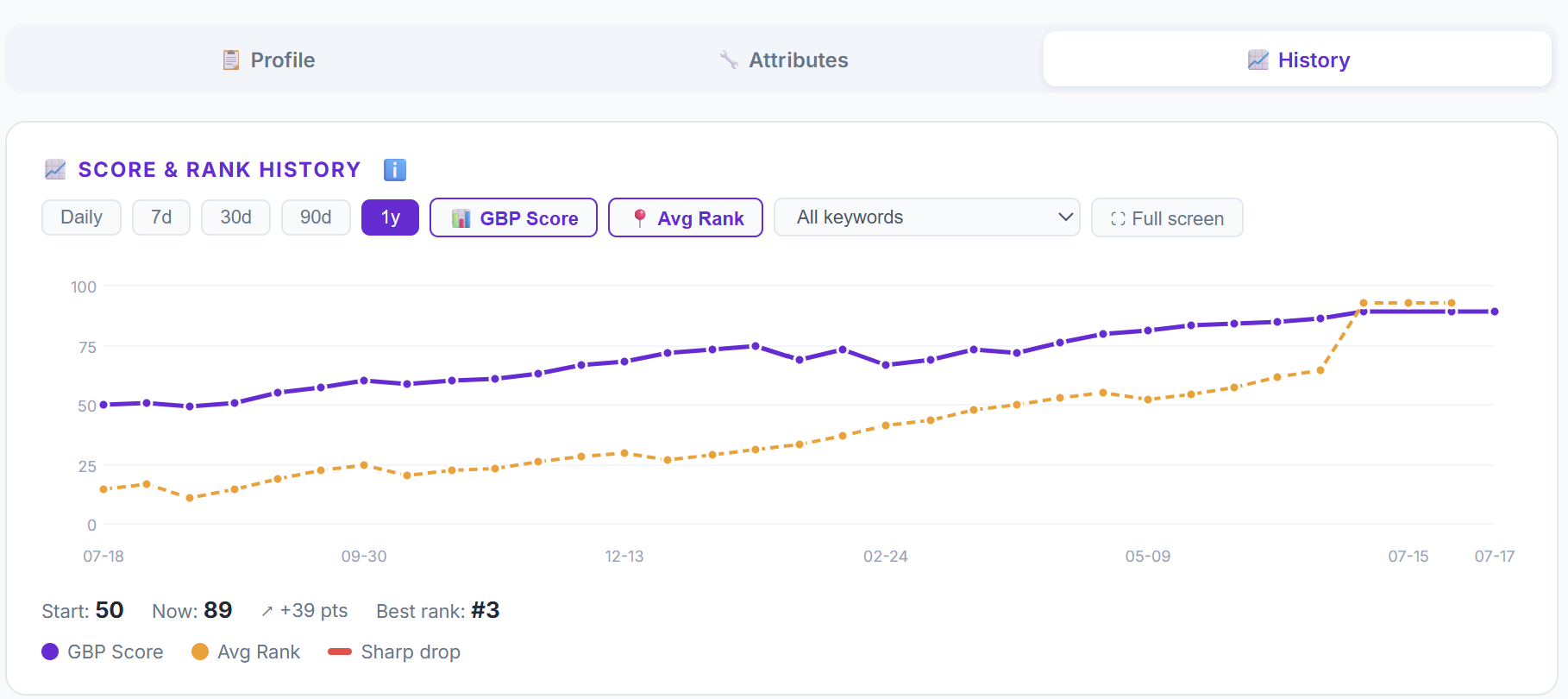
- Live GBP Score /100 per client profile
- Score Optimizer : missing criteria + point impact ★
- Sector-specific scoring (11 business categories) ★
- Weekly AVI Coach : Top 3 priority actions ★
- GBP Pulse : performance recap + opportunity map ★
- Automatic weekly email digest ★
✍️ Content & Posts
Example: an agency planning fleet-wide Google Posts with AVI and the editorial calendar.
AVI uses Gemini AI to generate content suggestions. Results vary by profile completeness and context, always review before publishing.
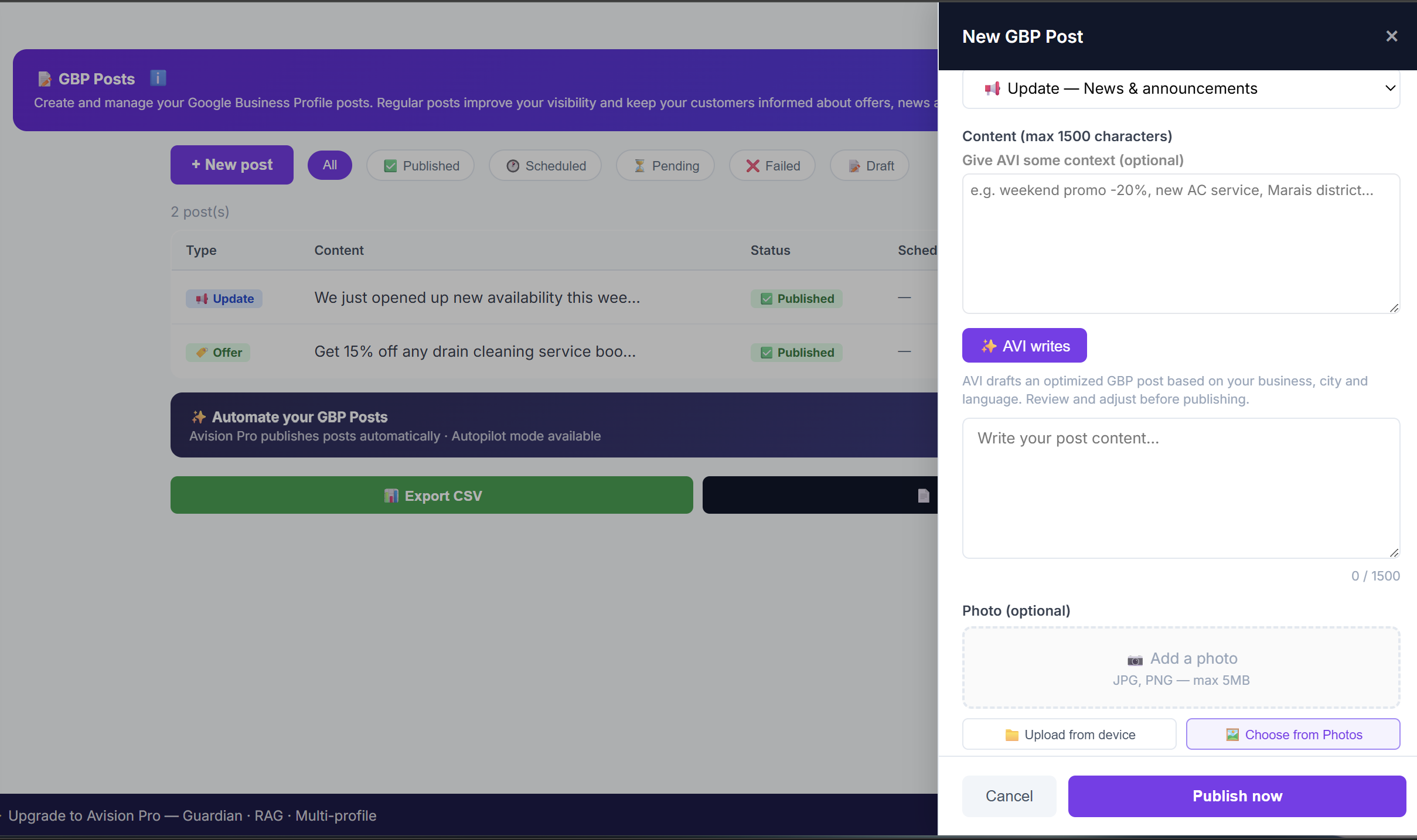
- AVI post generation : language, city, category-aware
- 3 post types: Update / Offer / Event
- Editorial calendar : drag & drop rescheduling
- Recurring posts with automatic AVI variants
- Variable substitution: {business_name} {city} {address}
- Bulk publishing across your entire fleet
Buy heatmap scan credits in bulk. Assign to clients individually or in bulk. Full control over your fleet scan budget.
Your logo, your brand name in the dashboard and PDF exports. Your clients see your agency, not LocalEdge.
Import clients via Google : select directly from your connected Google Business account, track per-client GBP Score, bulk assign credits, upgrade or downgrade tiers anytime with prorated billing.
Fleet Intelligence : Your agency cockpit
Everything included to manage your clients GBP
Monitor and respond to all your Google reviews directly from your dashboard. For each review, click AVI Write to get a suggested reply adapted to the tone and language, you review, adjust, then publish.
LocalEdge provides a guided checklist of the most important local directories. For each one, mark your listing status, add your URL and track your progress. Your Citations Score updates automatically as you complete each entry.
Create and manage your scan keyword list directly from the dashboard. Add, edit or remove keywords anytime, your heatmap always reflects your latest targeting.
Upload, organize and publish photos directly to your Google Business Profile. Sync your full photo library and rename for SEO. Publish immediately, scheduled publishing coming soon.
An in-app help tab with curated FAQs, Google update alerts and useful links, so you never get stuck managing your GBP.
Your GBP command center at a glance : Guardian status, Score, recent reviews, last scan, and quick-action shortcuts, all on one home screen.
Built on Google official infrastructure : not scrapers or workarounds
Example: an agency explaining approved access to the Google Business Profile API with OAuth 2.0 and revocable access.
LocalEdge connects to Google Business Profile via the official API, approved by Google after review. Your clients' Google accounts are never stored. Access is OAuth 2.0 and can be revoked at any time.
OAuth 2.0 secure connection, LocalEdge never stores your clients Google passwords. Full compliance with Google Terms of Service. No suspension risk across your entire fleet.
What you pay once. What is optional.
Agency Hub dashboard, white-label, bulk actions, PDF reports, AVI chat, reviews, posts, photos, citations, Guardian 15-day trial, all future features.
Heatmap scans (by grid size), scheduled posts and photos, social publishing (by platform) and recurring calendar actions. Credits are consumed per action : full grid visible in your dashboard. Credits included at purchase, top-up anytime.
Guardian 24/7 (from $4.90/client/mo), LocalEdge Pro with AVI Coach (from $9.90/client/mo), Bundle Pro+Guardian+Credits (from $14.90/client/mo). Regional prices may differ. Activate only what you need, cancel anytime.
- ✓Up to 10 GBP listings
- ✓Agency Hub + white-label
- ✓Shared credit pool
- ✓All Solo features per client
- ✓Upgrade to T2/T3 anytime : prorated
- ✓AVI Agency Chat : smart fleet management
- + Bulk Actions, PDF reports, AVI alerts...
🛡️ 30-day money-back guarantee
- ✓Up to 50 GBP listings
- ✓Everything in T1
- ✓Larger credit pool
- ✓Upgrade or downgrade anytime
🛡️ 30-day money-back guarantee
- ✓51+ GBP listings
- ✓Everything in T2
- ✓Maximum credit pool
- ✓Downgrade to T2/T1 anytime : free
🛡️ 30-day money-back guarantee
🛡️ 30-day money-back guarantee on all plans. No questions asked.
Calculate your agency margin
You pay once. You bill every month.

Built by someone who lived it
Anthony Verrons
Founder, LocalEdge — Former Head of Global SEO, Enreach (Netherlands)
After years managing multi-location Google Business Profile accounts at scale for one of Europe's largest telecoms groups, I built the tool I always needed — one that monitors every field that actually moves rankings, not just the obvious ones. LocalEdge is operated by Advantage Synergies LLP, registered in England & Wales (Company No. OC444202).
Connect on LinkedInFrequently Asked Questions
Can I manage multiple client locations from one dashboard?
Yes : LocalEdge Agency gives you a fleet dashboard where you can switch between all your clients GBP profiles in one click, sorted by score, rank, or Guardian alert status.
Is LocalEdge white-label?
Yes. Your clients see your agency name and branding in the dashboard, not LocalEdge.
How do shared credits work across my fleet?
You buy heatmap scan credits in bulk and assign them individually or in bulk across all your client profiles. Full control over your scan budget.
Can I upgrade or downgrade tiers later?
Yes : you can upgrade from T1 to T2 or T3 anytime with prorated billing. Downgrade available between billing cycles.
What happens if Google changes a client profile without permission?
Guardian monitors every client GBP 24/7. On the hourly API check, when anything changes, you receive an alert within the hour with the exact field, old value vs new value, and a one-click Fix Now button, before your client notices.
Is LocalEdge a Local Falcon alternative for agencies?
Yes : LocalEdge includes a GBP heatmap tool plus Guardian monitoring, AVI Coach, bulk actions and white-label reports. Entry price starts at $89 one-time vs Local Falcon's mandatory monthly subscription.
How do agencies make margin with LocalEdge?
LocalEdge is priced wholesale for agencies. You pay once for the platform, then charge your clients monthly for GBP management as a service. Every feature · Guardian alerts, weekly AVI Coach, heatmap, competitor battle, reports · is designed to justify your retainer and reduce churn.
Does LocalEdge help reduce client churn?
Yes. Guardian monitors every client profile 24/7 and alerts you within the hour on the hourly API check when anything changes. The competitor battle system tracks who is gaining ground on their keywords. AVI Coach delivers a weekly action plan so you always have something concrete to report. White-label PDF reports show measurable progress every month. Your clients see the value of your agency constantly, that is what eliminates churn.
🚀 Publish to all your clients' social networks in one click
Managing social media for multiple clients manually is impossible to scale. LocalEdge Bulk Publish lets you select clients, compose once, and publish to all their connected networks simultaneously. One action. All clients. Done.
Facebook, Instagram, LinkedIn, X/Twitter, YouTube, TikTok and Pinterest. Connect once, publish to all your clients simultaneously, including Threads and Bluesky.
Give AVI a simple context: a promotion, an event, a new service. AVI writes the post, adapted to each platform tone. You review, you publish.
AVI generates multiple versions of the same post with different angles and formulations. Publish regularly without ever repeating yourself. Fresh content, every time.
LinkedIn tone is not TikTok tone. LocalEdge lets you customize each post per platform, in one single workflow. One idea, adapted to every network.
Step 1: select your clients. Step 2: write your post. Step 3: choose platforms. One click publishes to all selected clients simultaneously. The time you save is pure margin.
Every content format your clients need. Text posts, photo posts, videos for YouTube and TikTok, carousels. All from the Bulk Publish interface, without any external tool.